
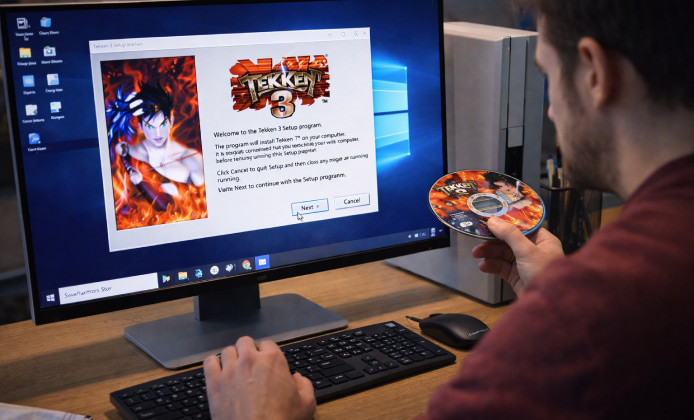
Tekken 3 remains a landmark fighting game thanks to its fast movement, memorable roster, and instantly recognizable stages. If you want to revisit it today, the smoothest approach is to install it legally using official storefronts when available, or by running your own disc backup through a trusted emulator. This guide walks you through practical options on PC, Android, and original PlayStation hardware while keeping your setup clean and stable.
Before You Start: Choose Your Platform
There are three common ways people play Tekken 3 now: original hardware, a modern console re-release (when available in your region), or an emulator on PC/Android. Your choice depends on what you already own and how you prefer to play.
- Original PlayStation (PS1): best for authenticity, requires a working console and disc.
- PC: best for higher resolution, controller options, and easy saves.
- Android: best for portability, but performance varies by device.
Tip: For the best experience, use a controller with a proper D-pad and map “sidestep” and “tag/command” actions comfortably.
What You Need
Gather the basics first, and the rest of the process becomes straightforward.
- A legitimate Tekken 3 copy (disc or licensed digital release).
- A stable emulator (for PC/Android) from a reputable source.
- A controller (USB, Bluetooth, or wired) for consistent inputs.
- Enough storage for your game image and save files.
Quick Compatibility Checklist
Use this table to match your device with a sensible setup path.
| Device | Recommended Method | Notes |
|---|---|---|
| Windows PC | PS1 emulator + your disc backup | Great visuals, easy controller mapping |
| Android phone/tablet | PS1 emulator app + your own game image | Use performance settings for smooth gameplay |
| Original PS1/PS2 | Play from the original disc | Most authentic, no configuration required |
Option A: Install on Windows PC (Emulator Method)
For most players, PC is the easiest way to get stable performance with crisp scaling and a comfortable controller setup. When people search for Tekken 3 install download, they often mean a safe way to get the required files ready without risking malware, so stick to official emulator sites and your own legally created game backup.
Step-by-Step
- Install a reputable PS1 emulator for Windows from its official website.
- Create a backup image of your Tekken 3 disc using trusted disc-imaging software.
- Open the emulator, set your preferred video renderer, and configure audio latency if needed.
- Connect your controller and map buttons, testing diagonals and quick taps.
- Load the game image and create a memory card file for saves.
Best Settings for Smooth Gameplay
- Resolution scaling: increase gradually to avoid stutter.
- Frame pacing: enable vsync only if it doesn’t add input lag.
- Controller polling: keep it consistent for reliable combos.
Option B: Install on Android (Portable Setup)
Android can run Tekken 3 well on many devices, but settings matter more than on PC. Make sure your emulator comes from a trusted store listing or the developer’s official page, and avoid “one-click installer” bundles from random sites.
Some guides phrase this as Tekken 3 download and install, but the clean approach is simply: install a known emulator, then load a game image you created from a disc you own, and you’ll avoid most common issues.
Step-by-Step
- Install a reputable PS1 emulator app from a trusted source.
- Transfer your legal game image to your device storage.
- Inside the emulator, scan/select the folder where the game image is stored.
- Set a performance-friendly renderer and keep enhancements modest at first.
- Pair a Bluetooth controller and map buttons for comfortable movement.
Option C: Original Hardware (No Emulator)
If you have a working PS1 (or compatible console) and an original disc, this is the simplest route: plug in, load the disc, and play. It’s also the best choice for players who want the original look, timing, and feel without tweaking settings.
On classic setups, the process feels closest to a true Tekken 3 game install because it’s essentially plug-and-play with the real media and memory card workflow.
Troubleshooting Common Problems
- Lower audio latency slightly, then test again.
- Switch the audio backend if your emulator supports it.
- Close background apps that spike CPU usage.
Slowdowns or Stutter
- Reduce internal resolution or disable heavy enhancement filters.
- Try a different renderer (for example, Vulkan vs. DirectX, depending on your emulator).
- Confirm your device isn’t thermal throttling during long sessions.
Controller Feels “Off”
- Re-map the D-pad carefully and verify diagonal inputs.
- Turn off extra smoothing features that can add latency.
- Use a wired controller on PC if Bluetooth introduces delay.
Clean, Legal File Handling Tips
If you plan to install Tekken 3 on multiple devices, keep your files organized and easy to back up.
- Create a folder structure like: Games / PS1 / Tekken3 / Saves.
- Name your memory card files clearly so you don’t overwrite progress.
- Store a backup of your game image on an external drive.
FAQ
- How do I avoid sketchy installers? Use emulator sources and avoid third-party bundles that promise “all-in-one” setups.
- What’s the simplest way to start playing quickly? For many users, the fastest path is to install Tekken 3 on a PC emulator, connect a controller, and run a game image made from a disc they already own.
- Can I play without paying again if I already have the disc? In that case, a Tekken 3 install for free can mean using your existing purchase by creating a personal backup and running it locally, rather than buying a second copy.
- Final Notes for a Great First Match
After everything is set up, jump into Practice mode, test movement speed, and confirm that inputs feel responsive. Save your configuration profile once it feels right, and you’ll be ready for long sessions without re-tuning. If you keep things tidy and follow trusted sources, Tekken 3 install will be smooth and dependable on whatever device you choose.


 Tekken 3 on PC: How to Enjoy the Classic Fighter the Right Way
 Tekken 3 Install Guide: Unlock Secret Characters and Arcade Mode
 Tekken 3 Full Version: Master Sidestep and Tag Combos in Game
 Tekken 3 APK: Enjoy Classic 3D Fighting Game on Laptop & PC
 Top 10 Interesting Facts About Tekken 3
 Tips for Playing Tekken 3